Set once. Launch anytime.
Save your local HTTP or mixed proxy port. The launcher applies these settings each time you open ChatGPT through it.
HTTP PROXY
127.0.0.1:7890 Local Route Launcher
App-specific settings for compatible ChatGPT installations.
A native Chinese / English interface,
without changing system proxy or DNS settings.
macOS 13+ · Apple Silicon · MIT License
For detectable Electron versions of ChatGPT.
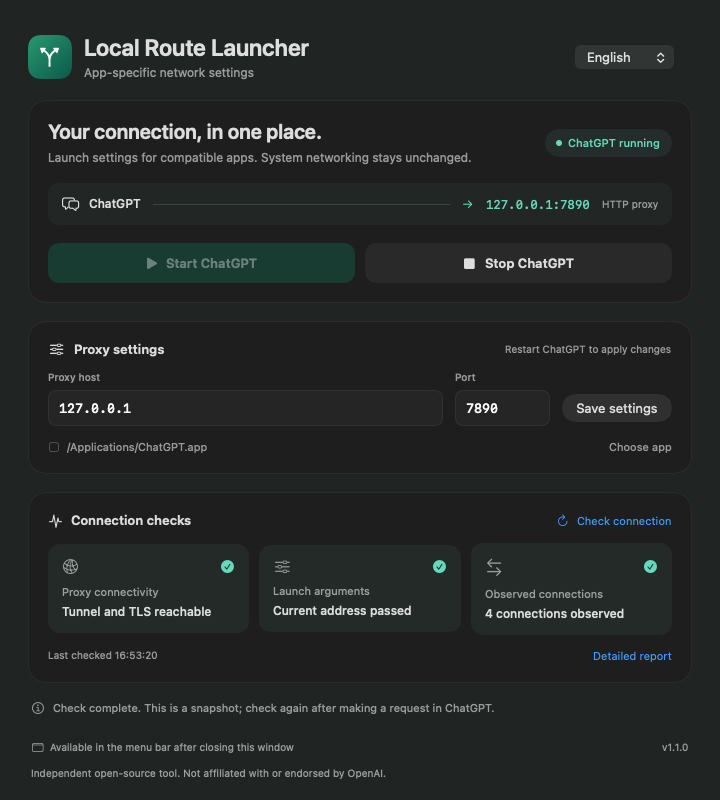
The everyday controls, together.
More room for the work that matters.
Save your local HTTP or mixed proxy port. The launcher applies these settings each time you open ChatGPT through it.
127.0.0.1:7890Start, stop, and check status from the menu bar. Close the main window and the Dock icon gets out of your way.
Inspect proxy connectivity, launch arguments, and actual TCP connections, with a local report to help you troubleshoot.
Open the DMG and drag the app to Applications.
Select English or 简体中文 in the launcher.
Keep your proxy app running.
Enter its host and mixed port, then save.
Fully quit ChatGPT.
Open it through the launcher to apply your settings.
Use the launcher for future launches too. Restart ChatGPT whenever you change its proxy settings.
Apple Silicon Macs running macOS 13 or later, with a detectable Electron version of ChatGPT. Intel Macs and older native ChatGPT versions are not supported. Switch between English and Simplified Chinese in the main window or menu panel. The choice is saved and takes effect immediately; macOS-owned menus and dialogs may follow the system language.
Yes. The launcher uses an existing HTTP or mixed proxy port; it does not provide a proxy service. Keep a proxy you are authorized to use running. Routing depends on the target application’s support for these settings. Proxies requiring username/password authentication are not supported.
That is not guaranteed. It uses app-supported proxy mechanisms, primarily covering Chromium HTTP, HTTPS, and WebSocket requests. Voice, WebRTC, UDP, and some child processes may not follow these settings. Connection checks are snapshots and cannot prove that all traffic uses the proxy.
The app is ad-hoc signed, but is not Developer ID signed or notarized by Apple. After verifying that it came from this project’s GitHub release page, allow it in System Settings → Privacy & Security. You do not need to disable SIP or system security checks.
The launcher does not read or store ChatGPT passwords, cookies, tokens, or conversations. There is no telemetry or automatic upload, and settings stay on your Mac. Connection checks send a HEAD request to chatgpt.com through your proxy, without account credentials. Read the privacy policy ↗
A small, free, open-source tool for a smoother day on your Mac.