v1.4.0 · MIT · macOS 13+ · Windows 10/11 · 30 Oct 2026
Local Route Launcher
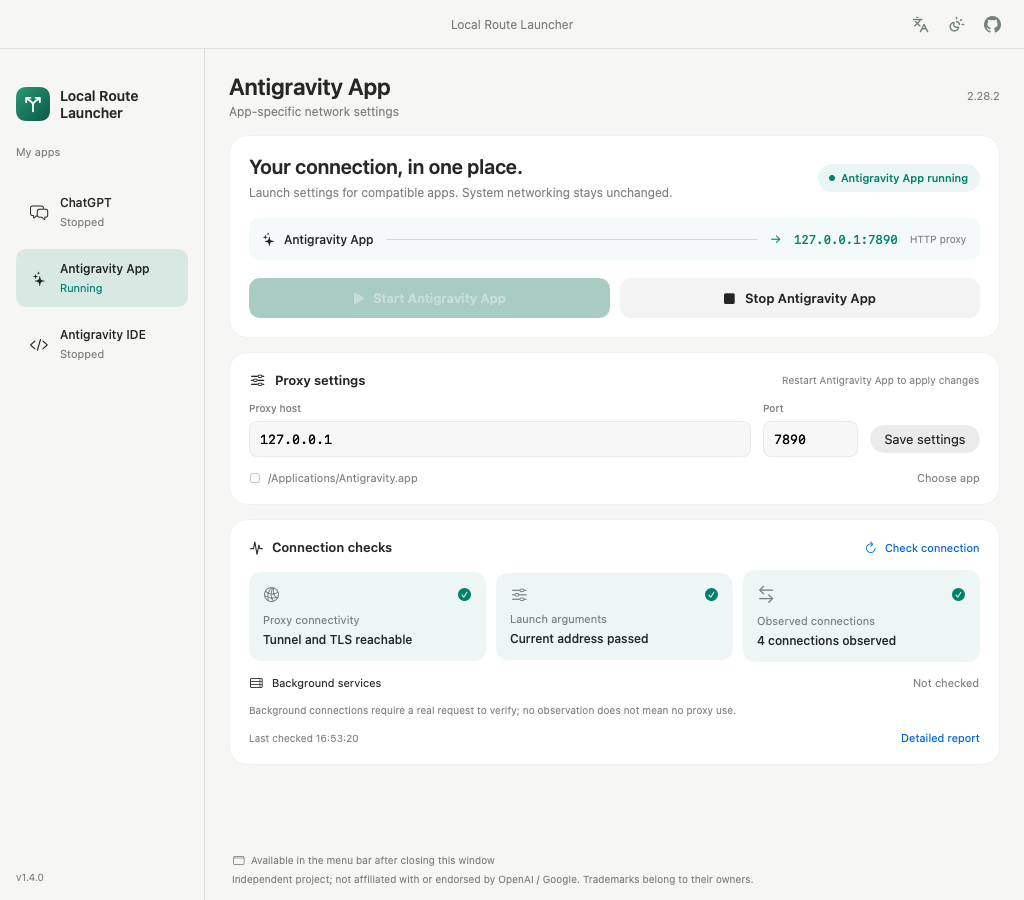
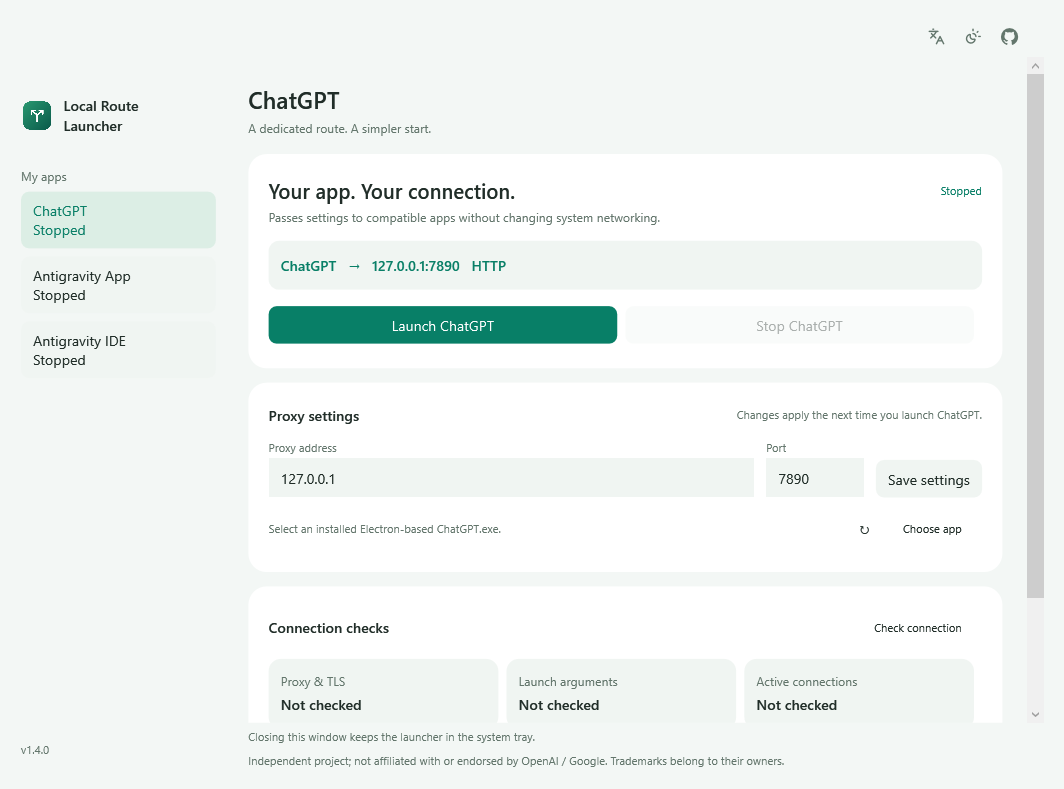
Keeps a proxy profile for each app it can start — ChatGPT, Antigravity App, Antigravity IDE — and passes that endpoint in at launch. It does not provide a proxy, and it does not change the system proxy, DNS or routing.
Download for macOS Download for Windows Official site All files and checksums Source
- Version
- 1.4.0 — 30 October 2026
- Starts
- ChatGPT · Antigravity App · Antigravity IDE — compatible installed Electron builds, one profile each
- Platforms
- macOS 13+ (Apple Silicon) · Windows 10 22H2 / 11 (x64)
- Not supported
- Intel Macs · Windows ARM64 (untested) · the pre-Electron ChatGPT app · Store packages that refuse a direct launch
- Built with
- SwiftUI + AppKit · C# / WPF (.NET runtime bundled, nothing else to install)
- Size
- 2.3 MB DMG · 53.9 MB Windows installer
- Interface
- Nine languages, switchable at runtime and remembered; system, light and dark appearance
- Settings
- One profile per app, per user — macOS preferences domain, local JSON on Windows. No account, no telemetry.
- Updates
- An update entry appears only when a stable release has an installer for this platform. It downloads that installer; running it is yours.
- License
- MIT
- Signing
- Ad-hoc on macOS, not notarised; Windows installer unsigned
- Checksums
- SHA256SUMS.txt on the release page
- Official site
- oliver804.github.io/Local-Route-Launcher/en
Scope
What it does, and what it does not
It does
- Keep one proxy profile per app — address, port and the path to the installed application — and switch between them from one column.
- Start the selected app with that endpoint passed as a Chromium launch argument and as proxy environment variables for its child processes.
- Ask an app to quit normally as well as start it. Nothing is force-closed, so unsaved work is not thrown away.
- Keep localhost off the proxy, so local tools keep working while the app is routed.
- Run four observations — proxy connectivity, launch arguments, observed connections, recognised background services — and keep the detail in a local report.
- Offer a menu-bar or tray panel, light and dark appearance, and nine interface languages, with a follow-system option.
It does not
- Provide a proxy, a tunnel or any network access. You need a local HTTP proxy that is already running and that you are allowed to use.
- Change the system proxy, DNS settings, routing table or any other system-level network configuration.
- Guarantee that every request from an app goes through the proxy. Voice, WebRTC and UDP traffic are not covered, QUIC is disabled so that HTTP requests stay observable, and child processes that ignore proxy environment variables will not follow.
- Patch the applications it launches. It passes arguments at launch; the app is free to ignore them, and its updates can change the behaviour this depends on.
- Establish that a signed-in session works, that a model is reachable, or that the traffic it could not see went anywhere in particular.
- Collect telemetry, ask for an account, or store settings anywhere except the local user profile.
Install
Once, then launch from here
macOS. Open the DMG and drag Local Route Launcher into Applications. The build is for Apple Silicon only.
Windows. Run the setup. It installs for the current user, needs no administrator rights, does not register a service and does not add itself to startup. The .NET runtime is bundled.
First run. Leave your proxy running. Choose the app in the left column, enter its address and port (for example 127.0.0.1 and 7890), save, quit that app completely, then press Start. Repeat for each app you want to route — the profiles do not share anything.
After that. Open each app through the launcher, not from the Dock or the Start menu — settings are applied at launch, and a normal launch does not carry them. Closing the main window keeps the launcher in the menu bar or tray; quitting the launcher does not stop the apps.
Walkthrough. The official site covers the same steps, with an FAQ for the Antigravity App and IDE cases summarised here.
If the system blocks it
Neither build is signed by a paid certificate
macOS uses an ad-hoc signature and is not notarised, so Gatekeeper will refuse the first launch. After checking the file, allow it in System Settings → Privacy & Security. There is no need to disable SIP or any other system protection.
The Windows installer is not Authenticode-signed and may trigger SmartScreen. Compare the SHA-256 against SHA256SUMS.txt before running it. If your organisation blocks unsigned installers, that is a policy decision, not a bug to work around.
This is a real limitation rather than a badge. An unsigned build can be blocked, and the honest response is to document how to verify it, not to tell people to switch protections off.
Questions
Short answers
- Does the launcher provide a proxy?
- No. It passes the address of a local HTTP proxy you already run. It has no servers, no exit nodes and no network access of its own.
- Which applications can it start?
- Compatible installed Electron builds of ChatGPT, Antigravity App and Antigravity IDE. The older native ChatGPT app is not supported, and a restricted Store package that refuses a direct launch will refuse this one too. If discovery misses an app, point at it with Choose app.
- Do the three profiles share settings?
- No. Address, port and application path are stored per app, and starting or stopping one has no effect on the other two. Each app still has to be launched from the launcher to pick up its profile.
- Will all traffic go through the proxy?
- No, and the launcher does not claim it will. Chromium’s HTTP, HTTPS and WebSocket requests are covered and QUIC is disabled; voice, WebRTC and UDP are not. A child process that ignores the proxy environment variables will connect directly.
- Why do I have to start the app from the launcher every time?
- Because the setting is an argument passed at launch. Opening the app from the Dock or the Start menu starts it without that argument, and an app that is already running has to be quit first — a second launch usually just brings the existing window forward.
- What do the four checks establish?
- Proxy connectivity means a CONNECT tunnel and a TLS response came back through the configured proxy. Launch arguments means the running main process carries the saved endpoint — the only check that answers the question directly. Observed connections is a TCP snapshot at one moment. Background services needs a real request from Antigravity’s language server before it reports anything. None of them signs in, reaches a model or proves that every request was routed.
- Does it work on an Intel Mac, or on Windows ARM64?
- No. macOS support is Apple Silicon only, and Windows support is x64 — ARM64 has not been verified, so it is not listed as supported.
- Does it store anything about me?
- The proxy address, port, app path and interface language, in the local user profile. No account, no telemetry, no automatic upload. A connection check makes one HEAD request to
chatgpt.comorantigravity.googlethrough your proxy, without account credentials. The optional update check sends ordinary request metadata to GitHub — not profiles, app paths, reports, accounts or chats. - Is it affiliated with OpenAI or Google?
- No. ChatGPT and Antigravity appear in the interface only to say which application a profile belongs to. Both names belong to their owners, and this is an independent project.
Why it is built this way
Design notes
The problem
A desktop application that needs a proxy offers a choice that looks trivial and is not. You can set an HTTP proxy for the whole system, or you can take over routing with a TUN interface. Both are one switch. Neither tells you afterwards which requests actually used it.
System settings apply to every application on the machine, so unrelated tools begin failing through a path you configured for one of them. TUN reaches lower still: it does not need the app to cooperate, and in exchange nothing above it can observe what happened. When a request fails you are left with a switch that is either on or off, and no way to ask a narrower question.
The narrower question
The question I actually had was smaller: how do I launch this one application with this one setting, for this one run? Chromium accepts --proxy-server at launch and honours HTTP_PROXY, HTTPS_PROXY and ALL_PROXY for its child processes. Passing those at launch scopes the setting to that process tree instead of the machine.
Three targets do not change that answer, they multiply it. Each app keeps its own profile, its own path and its own start button, and nothing is shared between them — because a setting that leaks from one app to another is the same failure as a setting that leaks to the whole machine, one level down.
Two consequences follow immediately, and both come from choosing the smaller door. Localhost stays off the proxy, because local tools should keep working while the app is routed. And an argument is a request, not a policy — the application is free to ignore it, and some of its children do.
What the narrow door costs
- The launch path becomes yours. Settings apply at launch; opening an app from the Dock or the Start menu will not carry them, and an app that is already running has to be quit first. The interface says so instead of hiding it.
- Environment variables do not bind every child. Voice, WebRTC and UDP traffic may behave differently, and QUIC is disabled so that requests stay visible to the proxy.
- The targets can move. An Electron update can change the behaviour this depends on, and Antigravity’s background service is a separate process whose network behaviour decides itself. No contract says otherwise.
- Three apps, two platforms. The sidebar makes it look like one screen. Underneath, there are three bundle identifiers, Launch Services on one side and process creation on the other, and a different set of arguments that each app is willing to accept.
Diagnostics that do not overclaim
A check is only useful if the failure it reports is real. There are four, and none of them is allowed to say more than it saw.
- Proxy connectivity — a CONNECT tunnel was established and a TLS response came back through the configured proxy. An HTTP 403 at this stage is a response, not proof that a chat session works.
- Launch arguments — the running main process carries proxy arguments matching the saved profile. This is the only check that answers the question directly.
- Observed connections — a TCP snapshot at one moment. The absence of a connection is not proof of direct access, and a hostname cannot be matched against a numeric address in the snapshot.
- Background services — Antigravity’s recognised language-server processes and whether they carry proxy connections. It stays “not checked” until the app makes a real request; an empty observation is not a clean bill of health.
Each limitation is printed beside the tick, not in a footnote. A diagnostic that says “connected” when it means “something responded” is worse than no diagnostic at all, because it ends the investigation.
The other half is packaging
Shipping was the part I underestimated. The build takes its version from a single file, maps compiler paths so local directory names never end up inside the binary, and will not publish a release until both platform builds have passed. The update entry is deliberately unintelligent: it appears only when a stable release carries an installer for your platform, and it hands the file to your browser rather than installing it on your behalf.
Neither build carries a paid signing certificate. macOS uses an ad-hoc signature, Windows ships unsigned, and both facts sit next to the checksums rather than in a footnote. That is a real limitation: the download can be blocked by the operating system, and the honest response is to document verification instead of telling people to switch security features off.
The tool is deliberately small: three apps, one launch path each, four checks that print their own limits. That is the only reason it fits on one page — and the only reason its limits can be listed without a disclaimer section.